


Recify - Keeper & Organizer
4.583.00 Reviews
App Specs
- Version
- 1.6.11
- Updated On
- License
- Free
- Downloads
- 10,000+
- Developer
- MIRO CONSULTING SRL
- Categories
- Food & Drink
- Platform
- Android, iOS
Screenshots






 Analysis by AppCompare
I used to save recipes wherever I happened to find them: a browser bookmark here, a social post there, and a note on my phone when I remembered to write one down. That collection was easy to build and oddly hard to cook from. Recify - Keeper & Organizer is aimed at that gap between spotting a dish and actually making it: it gives those loose finds a place to live, then connects them to meal planning.
That focus makes it most appealing if your recipe habit starts online and ends in a real kitchen. I’d consider it less essential if you already keep a small, tidy cookbook or mostly cook from memory. The useful question is not whether you can save another recipe, but whether you’ll return to it when deciding what to eat, shopping, and cooking.
From scattered finds to a usable collection
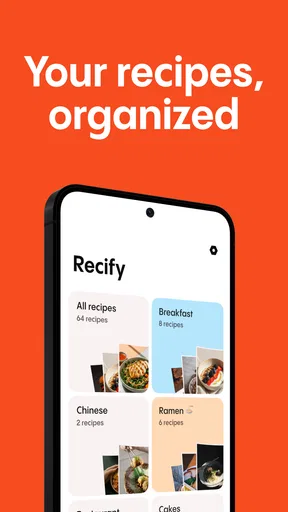
The first practical decision is what to bring in. If a recipe is on a website, saving it into an organized collection is more useful than leaving it in a browser tab you may never find again. If you come across an idea while scrolling social media, the same principle applies: capture it while it is in front of you, rather than trusting yourself to search for it later. The benefit is cumulative. A single saved recipe is convenient; a growing collection becomes a resource only when its contents are easy to recognize and retrieve.
I would sort recipes in a way that reflects how I actually choose dinner, not how a cookbook is traditionally arranged. Tags and notes can help separate weeknight meals from dishes that need more time, or mark a version I have already adjusted. That small bit of organization matters once the collection grows. Without it, a digital cookbook can become just another pile of saved links.
Turning saved recipes into a meal plan
The planner makes the collection more actionable. Rather than starting each evening with a blank page, I can pick dishes I already want to try and place them into a schedule. A realistic approach is to plan only the meals I expect to cook, leaving room for a busy evening or an unplanned change. The point is to make the week easier, not to turn dinner into another rigid calendar commitment.
From there, the shopping list is the useful handoff between the screen and the store. A planned recipe gives the list a purpose, while the list gives the meal plan a practical next step. I’d still review it before shopping: household staples, ingredient amounts, and substitutions are the kinds of details worth checking rather than assuming every plan is ready to follow without a glance. That quick check can prevent the familiar problem of arriving home with most, but not all, of what dinner needs.
Cooking, adjusting, and finding the recipe again
Once it is time to cook, search and filters can spare me from scrolling through every saved dish. I might look for a particular ingredient or dietary preference, then narrow the collection to something that suits the evening. Notes and photos add another layer: I can keep track of a change that worked, remember which version I made, or record a result for next time. These details are especially helpful when a recipe becomes part of the regular rotation.
Worth Reading Before You Choose

Flipboard Shows What News Apps Must Do Beyond the Feed

Switching to Android Auto Means Rethinking Your Driving Routine

Google Calendar Makes a Crowded Week Easier to Manage

Ludo King Makes the Most of the Minutes Between Plans

Baby Panda World Brings Quick Play to Modern Phones, but Its Game Library Feels Busy

ESPN’s Live Game View Makes Following Close Games Easier
Sharing can also fit naturally into this flow. If a family member asks for a dish I have made, sending the recipe is more convenient than copying it into a message. A shared recipe collection may help people trade ideas, too, though I’d treat it as a source of inspiration rather than assume every community suggestion has been tested in my own kitchen. Personal notes remain valuable when adapting a recipe to different tastes or ingredients.
First Impressions and Usability
When I first installed Recify - Keeper & Organizer, the clean and intuitive interface immediately caught my eye. The developers clearly put a lot of thought into making this app user-friendly. Navigating through the app feels like a breeze. There's no clutter, just a simple, effective layout that makes you want to start organizing your recipes right away.
One of the first things I noticed was how easy it was to add a new recipe. You can either manually type in your favorite recipes or import them from websites. The app supports a wide range of formats, which is a huge plus. There's also a feature that lets you snap a photo of a recipe from a magazine or book, and it intelligently scans and saves it for you. Genius, right?
Features That Make Life Easier
Let’s talk about some of the standout features. The app offers a handy meal planner, which I found incredibly useful. Planning a week's worth of meals is just a few taps away. You can drag and drop recipes into your meal schedule, and it even generates a shopping list based on your planned meals. This integration is seamless and saves so much time.
Another feature I can't stop raving about is the search and filter option. Imagine having a craving for something specific, like chocolate cake. Just type it in, and boom, all your saved chocolate cake recipes are at your fingertips. You can filter by ingredients, prep time, or even dietary preferences. It's like having a personalized search engine for your kitchen.
Sharing and Community
In today’s world, sharing is caring, and Recify gets that. The app allows you to share your recipes with friends and family with just a few taps. Whether someone needs your secret lasagna recipe or you're swapping ideas for a potluck, it’s all possible within the app. Plus, there’s a community feature where you can browse and save recipes shared by other users. It’s like having a virtual cookbook club at your disposal.
Customization and Personal Touch
Customization is where Recify - Keeper & Organizer truly shines. You can personalize your recipe collection by adding notes, tags, and even photos. This feature lets you tweak each recipe to your liking and jot down any changes or improvements you make along the way. It's perfect for those who love to experiment in the kitchen.
The app also syncs across multiple devices, so you always have your recipes handy, whether you're at the grocery store or cooking up a storm at a friend's place. This cross-platform support ensures you're never without your culinary arsenal.
Final Thoughts
All in all, Recify - Keeper & Organizer is a must-have for anyone who loves cooking or just keeping things in order. It’s packed with features that make managing recipes not only easy but also enjoyable. The app is constantly updated with new features and improvements, showing the developers' commitment to enhancing the user experience. Whether you're a seasoned chef or a kitchen newbie, this app is sure to become your best friend in the culinary world.
Ready to streamline your cooking adventures? Give Recify a try, and you'll wonder how you ever managed your recipes without it. Trust me, you won't regret it!
A realistic weeknight test
Imagine finding a recipe for a vegetable bake during a lunch break, then needing to make dinner after work. The useful workflow is to save the recipe at discovery, add a note if you already know you’ll swap an ingredient, and place it on the evening you have time to cook it. Before leaving for the shop, I’d check the planned ingredients against what is already in the kitchen. That last step is ordinary but important: the app can connect choices to a list, while I still need to make the list fit my cupboards and the actual meal.
If the dish works, a quick note about the change I made can save me from repeating the same guess next time. If it does not, I can remove it from my regular plans without losing the original idea. This is where a recipe organizer can be more than storage: it can hold a record of what I personally liked, instead of leaving me to remember which version turned out well.
Who benefits most—and who may prefer another approach
I’d recommend trying it if recipes arrive from several places and you often forget where you saved them. It is also a sensible fit for someone who cooks for a household and wants to make the jump from “that looks good” to a planned meal and a shopping trip. People who enjoy adapting recipes may get extra value from keeping their own notes alongside the original inspiration.
On the other hand, someone who rarely cooks from saved recipes may not need a dedicated organizer. A basic notes app or a handful of bookmarks can be quicker when the collection is small and meal planning is not part of the routine. Likewise, if your priority is discovering recipes rather than collecting and organizing your own finds, a recipe-publishing service may be a better starting point. Recify’s appeal is the personal library and the workflow around it, not simply having another place to browse.
Where convenience has limits
Importing is a shortcut, not a reason to stop checking. Recipes found online can be written in different styles, and an imported entry may still need a careful read before I rely on it. I’d verify the ingredient list and instructions against the original source, especially when a recipe has unusual wording or when I’m cooking for someone with a dietary restriction. Search and filters are only as helpful as the information available in the saved recipe, so adding a clear tag or note at the time of saving can pay off later.
There is also a practical trade-off in building a large collection: saving everything can recreate the same clutter in a new place. I’d be selective, keeping dishes I genuinely plan to make and using tags to distinguish reliable favorites from ideas I have not tried. That keeps the planner useful instead of filling it with aspirational meals that never reach the table.
Cost, access, and the decision to try it
Recify is free to install, with in-app purchases ranging from $3.49 to $39.99 per item. I’d start with the free experience and judge it by whether saving, finding, and planning recipes becomes part of my routine before spending on anything. The app is rated for Everyone, and its current version is 1.6.5, with Android 8.0 as the minimum operating-system requirement.
MIRO CONSULTING SRL is the developer behind this food and drink app. It was released on November 29, 2024, and has a 4.5 average from around 1.9 thousand ratings, alongside about 82 written reviews and over 10 thousand installs. Those figures suggest that other people are using it, but I’d still make the decision based on whether its workflow suits the way I collect and cook recipes.
Pros
- User-friendly interface for easy navigation.
- Efficient organization of recipes by category.
- Option to add personal notes to each recipe.
- Offline access to saved recipes.
- Supports multiple languages for wider reach.
Cons
- Limited free features; premium upgrade needed.
- Occasional sync issues with cloud storage.
- No integration with grocery delivery apps.
- Lacks video tutorials for complex recipes.
- Ads can be intrusive in the free version.
FAQs for Recify - Keeper & Organizer
What is Recify - Keeper & Organizer used for?
Recify - Keeper & Organizer is designed to help users efficiently manage and organize their digital files and documents. The app provides a centralized platform to store, categorize, and retrieve files with ease. Its intuitive interface and robust search functionality make it ideal for individuals looking to streamline their digital life and improve productivity.
Is Recify available on both Android and iOS?
Yes, Recify - Keeper & Organizer is available for download on both Android and iOS platforms. This ensures that users can seamlessly access their organized files across different devices. The app is designed to provide a consistent experience regardless of the operating system, making it versatile for multi-device users.
How secure is my data on Recify?
Recify prioritizes user data security by implementing advanced encryption protocols to protect your files. The app ensures that your documents are stored safely, with privacy measures in place to prevent unauthorized access. Additionally, users can enable two-factor authentication for an extra layer of security.
Does Recify offer cloud storage integration?
Yes, Recify integrates with popular cloud storage services, allowing users to sync their files effortlessly. This feature ensures that you can access your documents from anywhere, providing flexibility and convenience. The integration supports services like Google Drive, Dropbox, and OneDrive, among others.
Are there any subscription fees for using Recify?
Recify offers a free version with basic features, but to unlock advanced functionalities, a subscription is required. The premium version includes features like increased storage capacity, enhanced search capabilities, and priority customer support. Users can choose from monthly or annual subscription plans based on their needs.


